
The Ultimate Guide to Industrial Barcode Label Printers
Industrial barcode label printers are purpose-built machines that print high-durability labels for tracking, compliance, and identification in demanding environments — from factory floors to warehouses and distribution centers.
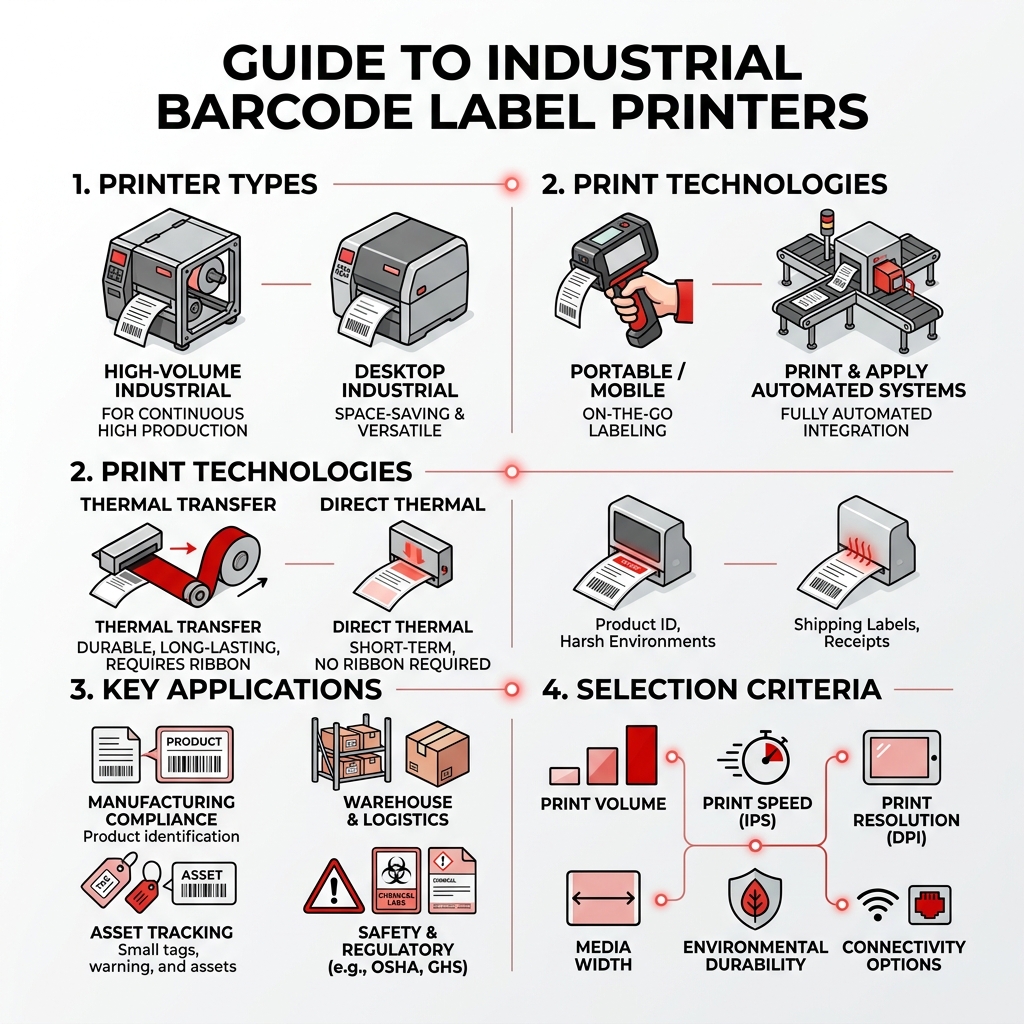
Here’s a quick overview of what you need to know:
| Factor | What to Know |
|---|---|
| Main types | High-volume industrial, desktop, portable, and print-and-apply automated systems |
| Print technology | Thermal transfer (durable, long-lasting) or direct thermal (short-term, no ribbon) |
| Key specs | Print speed (inches per second), resolution (DPI), media width, connectivity |
| Hardware | Compatible with various industry-standard printer engines |
| Common uses | Manufacturing compliance, warehouse rack labeling, asset tracking, GHS/OSHA labeling |
| Software | Most pair with dedicated design software for templates, CSV import, and ERP integration |
If your production line still relies on pre-printed labels or manual processes, you’re likely leaving efficiency — and money — on the table. Inconsistent labeling slows operations, creates compliance risk, and adds unnecessary cost.
Modern industrial barcode printers solve this by bringing label creation in-house. That means faster turnaround, tighter quality control, and labels tough enough to survive heat, chemicals, and rough handling.
For manufacturing managers dealing with slow throughput, labeling errors, or compliance headaches, the right printer — paired with the right automation — can be a genuine turning point.
This guide walks you through everything: printer types, print technologies, key specs to compare, real-world applications, and how to integrate barcode printing into a larger automated system.
Understanding the Main Types of Industrial Printers
In manufacturing and logistics, one size definitely does not fit all. Whether you are running a high-speed assembly line in Massachusetts, or managing a distribution hub in Southern Maine, the physical environment and the volume of labels you need will dictate which of the industrial barcode label printers is right for you.

High-Volume Industrial Barcode Label Printers
These are the workhorses of the industry. Designed for 24/7 reliability, high-volume industrial printers feature rugged metal frames and die-cast internal mechanisms that can withstand the vibrations and dust of a busy factory floor. Unlike their smaller cousins, these units accommodate high-capacity media rolls (often up to 8 inches in diameter or more), which means fewer stops to reload supplies.
Many of these models include internal rewinders. This allows the printer to peel the label from the backing automatically or rewind a finished roll of printed labels for later use. For facilities in New England that handle massive inventory cycles, these machines offer the durability required for 24/7 operation.
Portable and Desktop Solutions
Not every labeling task requires a massive stationary machine. Sometimes, you need to bring the printer to the product.
- Desktop Models: These are perfect for workbenches or shipping desks. They offer a compact footprint but still deliver professional-grade barcode quality. They are ideal for “high-mix, low-volume” environments where you might switch between different label types frequently.
- Mobile/Portable Printing: For field service workers or warehouse pickers, portable units are essential. According to technical specifications for portable units, modern portables can print at speeds up to 3 inches per second (ips) and come equipped with auto-cutters to keep hands free.
- Standalone Print Stations: Some modern setups eliminate the need for a PC altogether. Standalone stations allow users to plug in a keyboard or scanner directly to the printer, selecting templates from internal memory—a great way to save space in crowded New England workshops.
Thermal Transfer vs. Direct Thermal Technology
Choosing between thermal transfer and direct thermal printing is perhaps the most critical decision in the selection process. It determines not just the cost of your labels, but how long those labels will remain readable under pressure.
| Feature | Thermal Transfer | Direct Thermal |
|---|---|---|
| Mechanism | Uses a heated ribbon to melt ink onto the label | Heat-sensitive paper darkens when heated |
| Durability | High (resistant to chemicals, UV, and heat) | Low (fades over time or when exposed to heat) |
| Ribbon Required | Yes | No |
| Best For | Asset tracking, outdoor use, GHS labeling | Shipping labels, receipts, temporary tags |
| Archival Life | Years | Months |
Advantages of Thermal Transfer
Thermal transfer technology is the gold standard for industrial applications. The process involves a thermal printhead that melts a wax or resin-based ribbon onto the label material. This creates a permanent bond. Because the ink is literally fused to the surface, these labels can survive the harshest conditions, including chemical washes in pharmaceutical labs or the sub-zero temperatures of a Maine winter.
Using a material selection guide can help you pair the right ribbon (wax, wax-resin, or full resin) with the right substrate (vinyl, polyester, or paper) to ensure your barcodes remain scannable for the life of the product.
When to Use Direct Thermal
Direct thermal printing is simpler and often more cost-effective because it doesn’t require a ribbon. The printhead applies heat directly to a chemically treated, heat-sensitive label. While this is great for high-speed shipping labels that only need to last a few days, it is a poor choice for long-term asset tracking. If a direct thermal label is left in a hot truck or exposed to bright sunlight, the entire label may turn black, rendering the barcode useless.
For a broader overview of barcode labeling standards and common use cases, see Barcode label.
Key Features to Look for in Industrial Barcode Label Printers
When comparing different industrial barcode label printers, it’s easy to get lost in the sea of acronyms. Here is what actually matters for your bottom line.
Print Speed and Daily Volume
In high-speed manufacturing, time is quite literally money. Print speeds are measured in inches per second (ips). While a portable printer might chug along at 3 ips, a high-performance industrial model can scream through labels at up to 14 ips.
However, speed isn’t everything. You must also consider the “duty cycle”—the recommended daily volume. A desktop printer is often rated for about 500 labels per day, whereas a heavy-duty industrial unit can handle up to 2,500. Overworking a light-duty printer will lead to premature printhead failure and frequent downtime.
Software Compatibility for Industrial Barcode Label Printers
Hardware is only half the battle. You need software that can talk to your existing databases. Many leading printers come with specialized software suites. These programs allow you to:
- Import CSV data from Excel to automate bulk printing.
- Use pre-built templates for OSHA, ANSI, or GHS compliance.
- Integrate with Enterprise Resource Planning (ERP) systems.
For those looking to streamline their entire facility, More info about labelers can provide insights into how these printers fit into a broader equipment strategy.
To ensure your printed barcodes are actually readable, referring to a scanner compatibility guide is a smart move. High-resolution printing (300 to 600 DPI) is often necessary for small labels or complex 2D barcodes like Data Matrix codes used in electronics manufacturing.
Applications and Industry Use Cases
Industrial labeling isn’t just about sticking a barcode on a box; it’s about safety, compliance, and operational transparency.
Manufacturing and Compliance Labeling
Regulatory bodies like OSHA and ANSI have strict requirements for facility identification. In-house printing allows New England manufacturers to create custom pipe markers, GHS-compliant hazardous material labels, and “Arc Flash” warnings on demand.
For instance, using a safety identification catalog can help you identify the exact color-coding and sizing required for your facility’s infrastructure. Combining these labels with a comprehensive floor and area marking strategy ensures that your facility remains safe and compliant, reducing the risk of costly fines.
Warehousing and Logistics
In a warehouse, accuracy is king. Industrial barcode label printers enable:
- Rack Labeling: Durable polyester labels that won’t peel off or fade, ensuring scanners can read them from a distance.
- Cross-Docking: Printing shipping labels the moment a pallet arrives to move it directly to the outbound dock.
- Asset Tracking: Labeling everything from forklifts to hand tools with tamper-evident labels.
Integrating Printing into Custom Automation
For many companies in New England—from the tech hubs of Boston to the industrial parks of Nashua and Manchester—the ultimate goal is to remove the human element from labeling entirely. This is where EAM (Engineered Automation of Maine) steps in.
The Power of Print-and-Apply
Instead of a worker manually peeling and sticking a label, a “Print-and-Apply” system integrates the printer directly into the production line. These systems can print a unique barcode and apply it to a moving product in as little as five seconds.
Why Custom Integration Matters
EAM specializes in designing custom automation equipment that synchronizes your barcode printing with conveyors and inspection tools. Using Programmable Logic Controllers (PLCs), EAM can ensure that the printer only triggers when a product is in the correct position, and a vision system can immediately verify the barcode’s readability.
If you are looking to scale your operations, exploring More info about custom automation systems is the first step toward a “lights-out” manufacturing environment. By integrating real-time data capture with physical labeling, you create a closed-loop system that virtually eliminates errors.
Frequently Asked Questions About Industrial Barcode Printing
What is the difference between 300 DPI and 600 DPI?
DPI stands for “Dots Per Inch.” A 203 DPI printer is standard for most shipping labels. 300 DPI is the sweet spot for most industrial barcodes, providing a crisp image that is easy for scanners to read. 600 DPI is reserved for specialized applications, such as labeling very small electronic components or printing high-density 2D barcodes where every tiny dot must be perfectly placed.
How do I choose the right label material for harsh environments?
It comes down to three factors: surface, environment, and lifespan. If you are labeling a curved, oily pipe in a hot engine room, you need a high-tack vinyl label with a resin ribbon. If you are labeling a flat cardboard box for a two-day shipment, a standard direct thermal paper label is fine. Always consult a material selection guide to match the adhesive and the substrate to your specific New England environmental challenges (like humidity or extreme cold).
Can industrial printers be integrated into existing production lines?
Absolutely. Most modern industrial barcode label printers support standard printer languages and offer connectivity via Ethernet, Wi-Fi, and even Bluetooth. For full automation, EAM can design custom mounting and applicator arms to fit a printer into your current conveyor setup, allowing for seamless data flow between your ERP and the factory floor.
Ready to Choose the Right Industrial Barcode Label Printer?
Selecting the right industrial barcode label printers is a foundational decision for any manufacturing or logistics operation. By moving away from pre-printed labels and embracing in-house, high-volume printing, companies can save up to 75% on labeling costs while gaining the flexibility to adapt to new regulations or customer requirements instantly.
Whether you need a rugged desktop unit for a workbench in Bangor or a fully integrated print-and-apply system for a high-speed line in Boston, the key is to focus on durability, software compatibility, and the specific needs of your environment.
At EAM, we’ve spent over 30 years helping New England businesses solve complex labeling and automation challenges with customized solutions. Ready to take the next step in your labeling journey? Explore industrial labeling solutions from EAM and see how we can help you print with purpose and precision.